
Desk lighting for work and study – how do you choose a lamp that doesn’t strain your eyes?
Burning eyes at 4:00 p.m., neck tension, waning concentration—before you blame the monitor, take a look at your desk. When working remotely or studying, lighting is the most common—and also the cheapest to fix—cause of eye strain. Here are some tips on how to position your desk lamp, what color and brightness of light help you concentrate, and how a good desk lamp differs from a cheap one you might find at a discount store.

Table of Contents
- Why isn’t general lighting alone enough?
- On which side should you place a desk lamp?
- What light color is best for work and study?
- Brightness, distribution, and glare
- Desk lamp vs. monitor
- Desk lamps for students
- Features worth paying extra for
- How many lux on the desk and positioning relative to the window
- Summary
Why isn’t general lighting alone enough?
A ceiling light or chandelier illuminates the room, but leaves only 100–200 lux on the desk surface—and comfortable reading and writing require ok. 500 in the mission zone. What's worse, when we sit at our desks, we almost always block the overhead light with our own bodies. The result: we lean closer and closer to our documents, our eyes strain to make out details in low-contrast lighting, and we end the day with a headache.
The solution has been the same for decades: a local task light, i.e., a desk lamp—one that supplements, rather than replaces, general lighting. Working by a single lamp in a dark room is also tiring: the excessive contrast between the bright tabletop and the dark surroundings forces the eyes to constantly readjust.
On which side of the desk should you place the lamp?
The rule is simple: on the side opposite your writing hand. Right-handed people place the lamp on the left. Left-handed people place it on the right. This prevents your hand from casting a shadow on the text. Other settings:
- Lampshade height: approx. 35–45 cm above the desk surface —the light will then cover the entire A3-sized work area.
- Direction: toward the desk and documents, never toward your eyes or directly at the screen.
- When working exclusively on the keyboard and screen, the lamp can be placed on either side—the shadow of your hand no longer matters. The only thing that counts is the absence of glare on the monitor.
What light color is best for work and study?
For tasks requiring concentration, neutral white works best. 4000 K – maintains clarity and does not distort document colors. The warmer 3000 K is often more pleasant for evening work, but it can make you sleepy. The cooler 6500 K is stimulating, but after a few hours it becomes tiring and disrupts your evening rhythm.
Therefore, the most practical choice is a lamp with adjustable color temperature (CCT): 4000 K during work hours, 3000 K in the evening. You can read more about kelvins in our guide to light color.
Luminance, luminous flux, and glare
Three parameters determine comfort:
- Luminous flux: 400–800 lm in a task lamp is more than enough, provided the light reaches where it’s needed.
- Wide, even distribution —long LED strips illuminate the entire width of the desk, while spotlights only cast a patch under the shade.
- No glare – the light source must be hidden behind a diffuser. A bare LED in your field of view is a surefire recipe for eye strain. This is the same phenomenon described in professional lighting by the UGR index—the lower the value, the better.
When working with documents for extended periods, you’ll also appreciate the high CRI (90+) —the colors in your prints and notes look natural.
Desk lamp vs. monitor
The monitor emits light on its own, but its surroundings shouldn’t be plunged into darkness. Ideal:
- General lighting on —moderate, with no glare on the screen.
- A lamp illuminates documents and the keyboard, positioned so that its reflection does not appear on the screen (move or tilt it until the reflection disappears).
- Soft wall lighting behind the monitor works well (e.g. LED strip) – reduces the contrast between the bright screen and the background, which significantly reduces eye strain when working in the evening.
Desk lamp for students
Children are less likely to report eye strain, and visual habits are formed precisely while doing homework—which is why good desk lighting is particularly important here. A desk lamp for a student should have:
- a stable, heavy base or clamp mount —it will withstand being bumped by an elbow,
- an adjustable arm and head – a student’s desk changes function every hour: notebook, book, building blocks,
- a touch dimmer – easy to use, no need to search for a switch under the shade,
- a neutral 4000 K color temperature for studying, and a warmer one for evening reading.
Colorful models—from dinosaurs to RGB lamps with speakers—can be found in the category Childrens Desk Lamps, and classic desk lamps at Desk lamps.
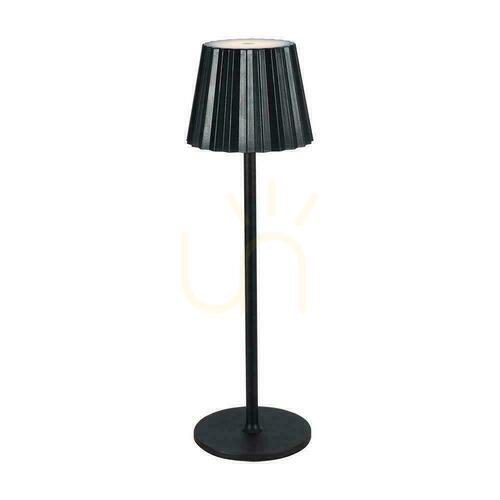
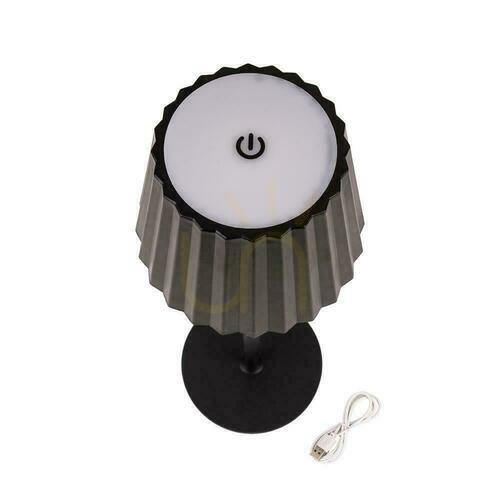


Features worth paying extra for
- Brightness and color temperature (CCT) adjustment – one lamp for the entire workday.
- Memory mode – the lamp remembers your last settings. A small detail you’ll appreciate every day.
- USB port in the base – charge your phone without another power adapter on your desk.
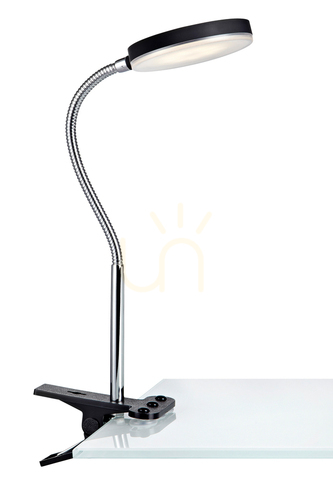
- Clamp arm – frees up desk space and allows you to precisely position the light over your work area.
- Timer / presence sensor – turns off the light in the student’s room after study time ends.



How many lux on the desk and positioning relative to the window
Workstation lighting standards specify a minimum of 500 lux on the desk surface, and for precision work (technical drawing, fine assembly, sewing) as much as 750–1,000 lux. In practice, you can’t measure lux without a meter, but this translates to a lamp with a luminous flux of 400–800 lm directed at the work area, plus moderate general lighting—so that the contrast between the bright work surface and the surroundings doesn’t strain the eyes.
Just as important as the amount of light is minimizing glare and reflections:
- people who wear glasses and work at a glossy desk should position the lamp so that its reflection doesn’t hit their eyes— a matte diffuser and light coming from the side, not from behind the screen, helps.
- If your desk is by a window, position the work surface sideways to the window (not facing it or with your back to it)—this will prevent both daylight reflections on the monitor and working “against the light,”
- during the day, use the blinds to control the amount of sunlight, and adjust the lamp’s color temperature to the time of day: neutral 4000 K during the day, warmer in the evening.
When purchasing, look for a low flicker rate —along with insufficient brightness, this is most often responsible for eye strain after hours of work.
Summary
Comfortable desk lighting is a combination of moderate general lighting plus a 400–800 lm task lamp with a color temperature of 4000 K, positioned on the opposite side of your writing hand, with a diffuser instead of a bare LED. For students, add an adjustable arm and a simple dimmer. For evening work, switch to warm white. You can find our entire selection of desk lamps in the category Desk lamps.
Victoria


Maybe you will be interested in products from these categories?
Desk Lamps, Table Lamps
Tags & Blog Categories